Lets say you have a glossary in 2 columns (A and B) and you want to check all the cells that refer you to another headword with the string see x. or βλέπε or even a specific character like a parenthesis. Let's say you want to check for instances of this string on column B with all the rows that contain the given string.
Showing posts with label Excel. Show all posts
Showing posts with label Excel. Show all posts
Thursday, 21 January 2010

Friday, 6 November 2009
Shortcut to toggle between sheets on the same excel workbook
Shortcut to change (toggle) between sheets on the same excel workbook
Ctrl+Page up
Ctrl+Page down
Ctrl+Page up
Ctrl+Page down
Monday, 14 September 2009
Sorting a column on the number of characters in cells (Excel)
If you have 2 columns with data, say A and B. On column C, cell 1 enter =LEN(B1) if you want to count on the basis of the number of characters in column B, or =LEN(A1) if you want to count on the basis of the number of characters in column A.
After you enter that on the cell, press ENTER and then place the mouse on the corner of the cell and drag down to copy the formula.
Then select the column with the counts and click Sort.
After you enter that on the cell, press ENTER and then place the mouse on the corner of the cell and drag down to copy the formula.
Then select the column with the counts and click Sort.
Wednesday, 3 October 2007
Deleting duplicate rows and other useful tricks for Excel
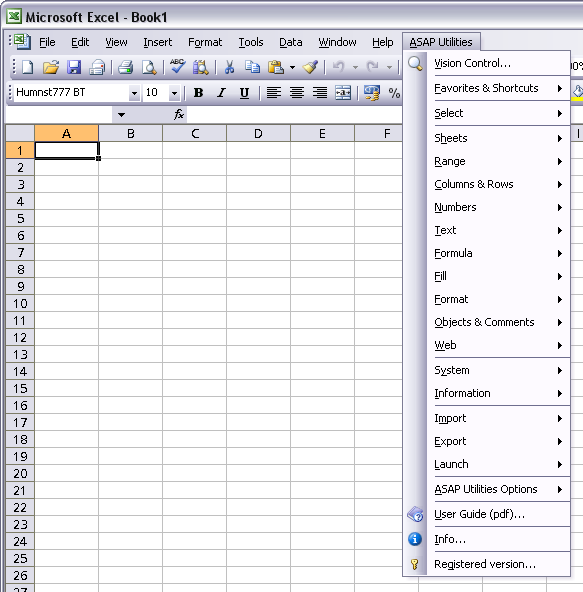
There is a free and magical add-on, called Asap utilities. You can even select a sheet in Excel and change case (although it has some problems with non English characters, for example when converting Ç to lowercase and vice versa the cedille is lost) or delete empty leading-trailing spaces (useful in glossary maintenance).
Find / Replace in all sheets
Search/find and/or replace in all sheets at once. Shows all matches in a box which allows you to walk through the results easily.
Easy to find text across all sheets. Also has the power to deal with special characters such as line feeds (alt+enter), carriage returns and tabs.
Move screen (place selection in top-left of screen)
Move the screen. This will place your selection in the left-top of the screen)
Show selection in center of screen
Place your selection in the center of your screen. Easy because you don't have to use the scrollbars.
Custom formula error message
The custom formula error message makes it easy to display a custom message for formula errors. This means that in stead of e.g. #VALUE! You can have your own (more logical) error message displayed.
Paste Special (with combinations)
Paste Special, with multiple options combined e.g. paste both values AND formatting at the same time
Paste values and formatting
Paste your selection with both values & formatting at the same time
Convert cell's value to its formatted look
Convert the value or formula in selected cells to the way they are formatted.
E.g. cell A1 with the value [=12*2] formatted as [EUR 24,-]
This function will put ['EUR 24,-] in cell A1.
Copy formulas without changing their references
Copy formula's exactly. Normally you have to block all references with $ if you want to achieve this. Not with this function. It will copy all formula's exactly without changing any references.
Move selected range (only values)
Move the data in your cell's, without the formatting. Just like the copy and paste as values, but now moving.
Copy multiple selections
Copy multiple selections. Something that is normally not possible in Excel.
Transpose data with formulas
Transpose data with formula. This will transpose your data and keep the correct formulas.
Empty duplicates in selection
Empty duplicates in selected cells. This will empty all duplicate values that are found. The first cells containing the duplicated value will keep its value.
Randomize list
Randomizes a list by row.
Flip selected cells
This will flip the selected cells. e.g. if you have selected three cells in one row, containing the number 15, 16 and 17, this utility will reverse the order to
17, 16, 15. This utility works for selections in one row or one column.
Delete all rangenames in selection
Remove all rangenames in your selected range.
Delete all range names in the entire workbook
Remove all rangenames in the entire workbook.
Microsoft Excel can't proofread Korean text. This feature is not installed. Would you like to install it now?
This message has bugged me for quite some time. It appeared when I started entering English text and then appeared again when I changed to Greek.
Apparently there is no solution to this apart from getting the Korean proofing tools. One way is by downloading the Korean Language Pack (Office XP). Another is by using Microsoft's Proofing tools CD (I am talking for Office 2003 here). Hint: you can find it as a torrent.
Apparently there is no solution to this apart from getting the Korean proofing tools. One way is by downloading the Korean Language Pack (Office XP). Another is by using Microsoft's Proofing tools CD (I am talking for Office 2003 here). Hint: you can find it as a torrent.
Subscribe to:
Posts (Atom)